Hyper-Realistic Urban Night Portrait with UI Overlay
Fashion portrait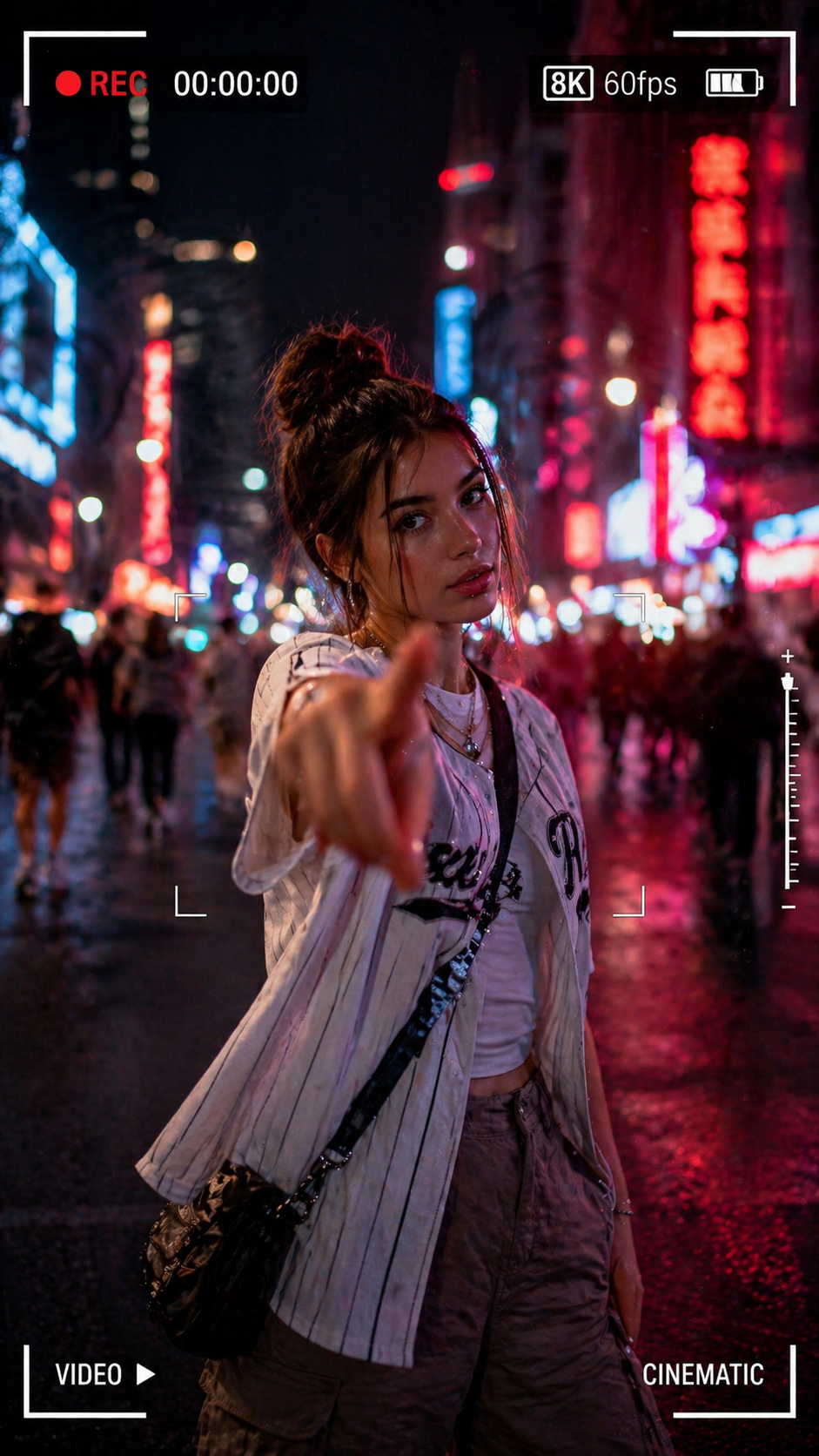
illustration
poster
portrait
cinematic
3d
anime
fashion
cartoon
pixel-art
youtube
Prompt
{
"request_id": "portrait_neon_urban_001",
"configuration": {
"model": "v6.0_or_latest",
"output_settings": {
"dimensions": {
"width": 1080,
"height": 1920,
"aspect_ratio": "9:16",
"target_resolution": "64K DSLR"
}
}
},
"scene_composition": {
"subject": {
"entity": "Young woman",
"pose": "Standing confidently",
"action": "Extending index finger forward toward camera lens",
"interaction": "Dynamic gesture / POV interaction",
"wardrobe": {
"outerwear": "White striped baseball-style shirt",
"undergarment": "Light inner shirt",
"bottoms": "Cargo pants",
"accessories": [
"Necklace",
"Crossbody bag"
]
}
},
"environment": {
"location": "Urban street",
"time_of_day": "Night",
"ambience": "Neon-lit",
"background_elements": [
"Colorful city lights",
"Blurred passersby"
]
},
"cinematography": {
"camera": {
"perspective": "Wide-angle",
"depth_of_field": "Soft bokeh",
"motion": "Slight motion blur"
},
"lighting": {
"style": "Cinematic",
"primary_sources": ["Neon street lights", "City glow"]
},
"ui_overlay": {
"enabled": true,
"aesthetic": "Smartphone video recording",
"on_screen_elements": [
"REC 00:00:00",
"8K/60fps",
"Frame brackets",
"VIDEO indicator",
"CINEMATIC indicator"
]
}
}
},
"technical_rendering": {
"style": "Hyper-realistic",
"engines": [
"Octane Render",
"Unreal Engine 5"
]
},
"negative_prompt": {
"stylistic_exclusions": [
"cartoon",
"illustration",
"anime"
],
"quality_exclusions": [
"low quality",
"pixelated",
"blurry"
],
"anatomical_exclusions": [
"bad anatomy",
"deformed hands",
"extra fingers",
"missing limbs",
"bad proportions"
],
"branding_exclusions": [
"watermark (except for requested UI overlays)"
]
}
}
How to Use This Prompt
- Copy the prompt text above
- Open your preferred AI image generator (Midjourney, DALL·E, Stable Diffusion, or Flux)
- Paste the prompt and generate
- Adjust one element at a time to customize for your project
Related Fashion portrait prompts
Explore more Fashion portrait prompts